The internet, a marvel we use daily, hides layers of complexity beneath its surface. Ever pondered what transpires behind the scenes when you enter a URL? Today, let's satisfy our curiosity and uncover the intricate web of processes initiated by a simple command: typing "https://www.google.com" and hitting Enter.
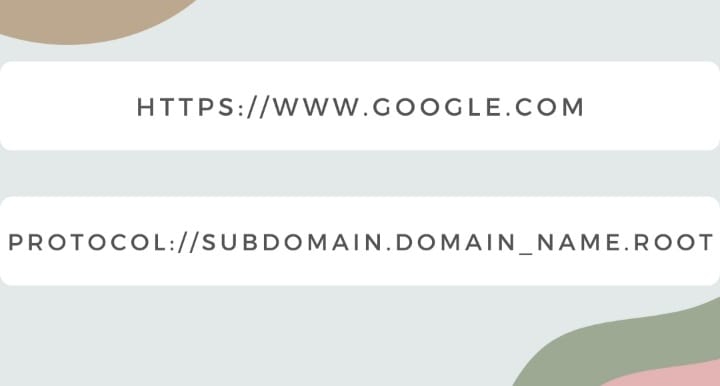
The URL "https://www.google.com" is a Uniform Resource Locator (URL) used to uniquely identify resources, such as "https://www.google.com", over the web.
HTTPS stands for Hyper Text Transfer Protocol Secure. Web browsers like Google Chrome use HTTPS to securely encrypt requests to www.google.com. Domain names like "google.com" serve as human-readable addresses for websites, while subdomains such as "www.google.com" are utilized to organize and navigate to various sections of the website.
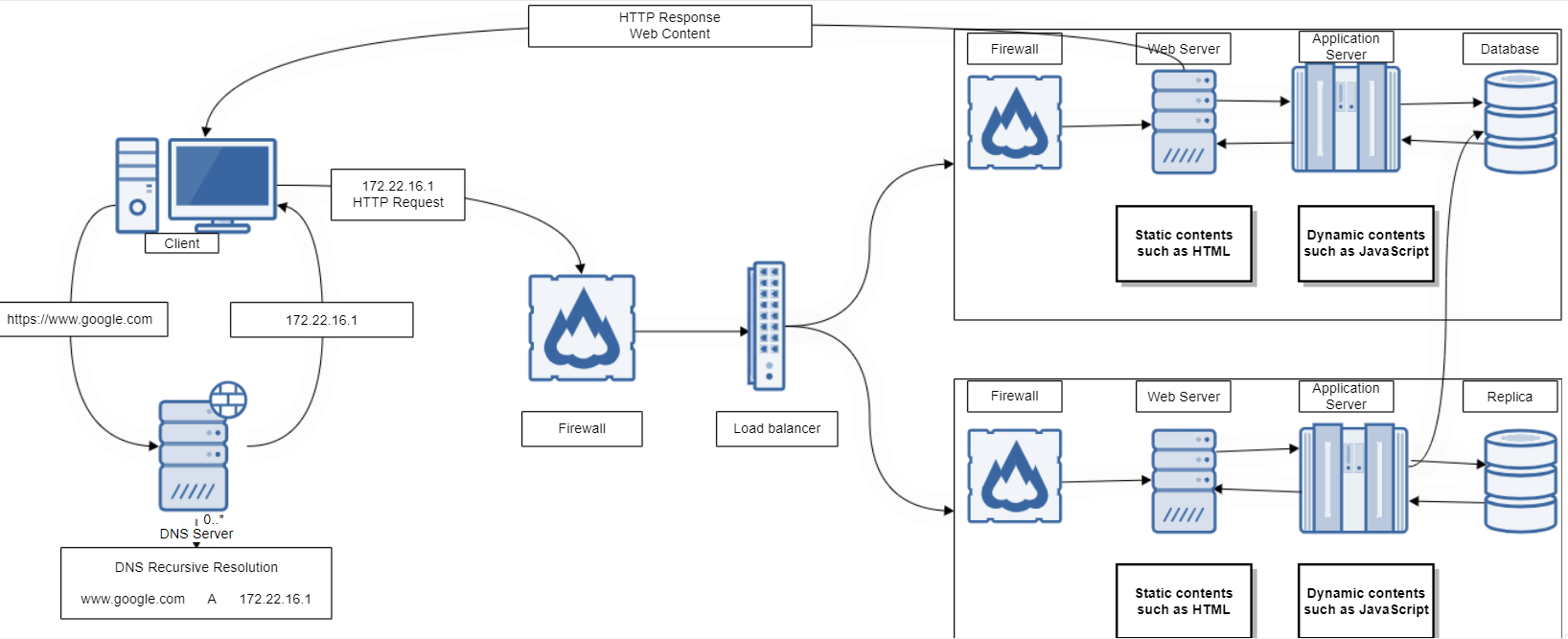
Now that we understand what "https://www.google.com" represents, let's proceed to type it into our browsers and hit 'Enter'. Within milliseconds (assuming we have never come in contact with the URL) DNS Recursive Resolution occurs. Domain Name System (DNS) servers are like phonebooks for the internet. When you type a URL like "www.google.com" into your browser, the DNS server translates this human-readable domain name into an IP address (e.g. 172.22.16.1) that your computer understands. It's similar to looking up a contact name in your phone and finding their phone number.
The DNS Recursive Resolution process relies on a DNS resolver, which acts as a server responsible for determining the IP address associated with a specific domain name. This resolver initiates a series of queries across various DNS servers, beginning with the root servers and traversing through the hierarchical structure of the domain name system. Once the IP address is obtained (172.22.16.1), it's temporarily stored or cached by the resolver. This caching mechanism helps optimize future requests, ensuring that subsequent attempts to access "https://www.google.com" or any associated resources don’t require repeating the entire resolution process. Instead, the resolver can directly use the cached information to swiftly connect users to the intended website.
IP addresses are numerical labels assigned to your device connected to a computer network. They serve as unique identities, allowing devices to communicate with each other over the internet or a local network. Our computer then sends a TCP/IP request to Google’s IP address.
TCP/IP stands for Transmission Control Protocol/Internet Protocol. TCP/IP is a set of networking protocols that allow our computers to communicate on a network such as the Internet to access "google.com". It enables end-to-end communication between devices regardless of the underlying network infrastructure. Imagine sending a letter: you write the content (data), put it in an envelope (packet), and address it (destination). TCP/IP does something similar but in four main layers:
Application Layer: Think of this as the 'content' layer. It includes web browsers, email, and other applications that use the internet. When you type a URL, this layer handles the data and formatting.
Transport Layer: This layer ensures the 'envelope' reaches the destination correctly.
Internet Layer: Similar to addressing an envelope, this layer handles the 'addressing' of data packets, adding the sender and recipient IP addresses. It helps route packets across networks.
Link Layer: This layer is like the physical 'sending' process. It deals with the actual hardware (like Ethernet or Wi-Fi) to transmit data packets between devices.
Before the content we are requesting is delivered to us, we have to go through some security system called Firewall. Just like the way we fence our houses to protect our valuables from trespassers, Firewalls are network security systems that prevent unauthorized access to a network. It monitors and controls incoming and outgoing network traffic based on predetermined security rules.
We have successfully passed through the firewalls. Data (the content contained in "google.com") is transmitted between our browsers and "google.com" IP using HTTPS/SSL. HTTPS/SSL adds a layer of security through encryption, ensuring that the data exchanged between the browser and the website remains confidential and protected from unauthorized access.
Secure Sockets Layer (SSL) is a foundational technology in ensuring secure data transmission over the internet. SSL ensures secure, encrypted, and authenticated communication between us and the websites, protecting sensitive information from eavesdropping and unauthorized access.
Imagine multiple people reading this blog trying to type in "https://google.com" on their browsers at the same time, you guessed right there will be traffic. To mitigate that, Load balancers are introduced to evenly distribute incoming requests. Load balancers are a critical component in network architecture that efficiently distributes incoming network traffic across multiple servers, making the application reliable, efficient, and available to the users.
Our applications, such as "google.com", are hosted on a combination of servers including web servers, application servers, and databases.
A web server is software or hardware that serves web content, responds to requests from clients (such as web browsers), and delivers web pages, files, or other resources over the internet. When a user enters a URL ("https://www.google.com") into a web browser (like Chrome, Firefox, etc.), a request is sent to the web server associated with that URL, it then processes the request and sends back the requested content to the user's browser using the network protocol (TCP/IP) we looked into earlier.
Application servers stand as the powerhouse behind the scenes, fueling the dynamic content that brings websites and services to life. They play a pivotal role in crafting user experiences that are both dynamic and personalized. Application servers are the architects of dynamism on the web. Imagine a news website; every time you visit, fresh articles populate the homepage, reflecting the latest events or topics of interest. This dynamism is orchestrated by application servers, dynamically assembling content fetched from databases, news APIs, or other sources. These servers process requests in real time, tailoring content to suit users' preferences or browsing behaviors.
Databases are integral to websites, serving as the backend storage where various types of data are stored and managed to facilitate website functionality. A database is usually controlled by a Database Management System (DBMS). DBMS is used to easily access, manage, modify, update, control, and organize data. It serves as an interface between users, applications, and the database itself. The two types of databases are Relational databases such as SQL, and Postgre SQL and Non-relational databases such as NoSQL.
Once the server has gathered all the necessary files and data, it sends them back to your browser, which then displays the Google website on your screen.
Well, it's here! This happens when you type “https://www.google.com” into your browser and press Enter. This may seem like a lot, but the process goes very quickly.
To visually summarize this process, the following diagram provides an overview of the entire sequence.